QR Code & Barcode Scanner3.1.0
Continue to app
Free Version
Publisher Description


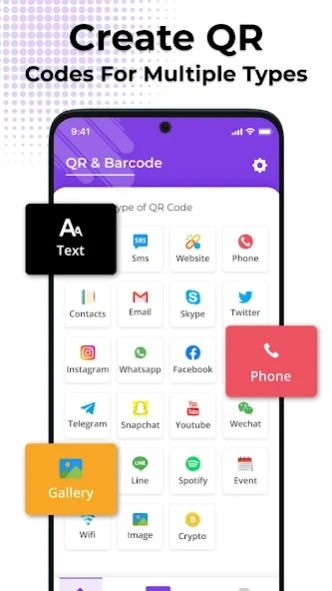

Fast, accurate scanning and customized QR & barcodes. Scan and share with ease.
QR Code Maker App – All in One QR Code Maker App!What about a mobile application with multi-dimension capabilities to scan and generate barcodes? The QR Code Maker App is perfect for all kinds of barcode requirements. If it is scanning, generating or managing codes, this app aims at delivering fast and easy services. It has new technologies, along with a more intuitive design appealing, this QR Code Maker App elevates an individual’s daily tasks.
With the app QR Code Reader And Scanner, you can scan codes, and with the app QR Code Generator, you can create any bar codes you like. It’s one of the best QR Scanner For Android and QR Reader For Android that is so easy to use and works so well.
📄
Looking forward to QR Code Reader And Scanner Features:
📄
📌 Codes can be created for the URLs, Wi-Fi passwords, messages, etc;
📌 Create code templates for personal or professional purposes;
📌 Store the codes on your device or send them through emails or SMS;
📌 The QR Scanner For Android allows scanning and decoding of codes and barcodes in an effective manner;
📌 History of scans is available to allow previously scanned codes to be accessed at any time later on.
Enjoy Hassle Free Scanning and Generating!
With only a few clicks, the QR Code Generator turns all data into business-level bar codes. It has now become simple to create custom bar codes by simply inputting the data, choosing a design, and generating it! Get perfect information cards for contacts, website links, events and even Wi-Fi passwords.
The QR Code Reader And Scanner will give you the best experience in scanning accuracy ensuring fast high quality barcode decoding as a result. QR Scanner For Android and QR Reader For Android: designed for Android provides seamless experience for all scanning purposes.
Stay Organized with QR Maker App:
📱
Ensure that all your barcodes are in one place. The QR Template App can never let you lose focus on your scans! It has a history management feature which assists in managing scanned barcodes and barcodes scannable. Retrieve and go through past scans, access information that was previously stored, and find all the details in the simplest QR And Barcode Scanner interface.
Privacy and the reliability:
📲
The QR And Barcode Scanner takes your privacy very seriously. With this application, users will be able to scan and generate codes confidently knowing that their data is secured. This app is dependable —whether in a bar, at the office, it accomplishes all of the essential functions to make scanning, searching and creating barcodes easy.
Obtaining a Barcode and sharing it with others:
⬆️
The QR Code Maker App allows you to easily share bar codes. This app is useful if you want to share an event link or exchange contact details. You can directly share your bar codes through your Android device within just a few key touches.
Why delay? Hop on to using the most amazing QR And Barcode Scanner!
All the operations are very smooth while working with the QR Template App. The app lets you scan starting from QR Reader For Android, and through the usage of QR Code Generator it allows you to create specific codes. Don’t wait any longer, get the QR Maker App and unleash all the possibilities of scanning and generating barcodes through your Android device.
About QR Code & Barcode Scanner
QR Code & Barcode Scanner is a free app for Android published in the System Maintenance list of apps, part of System Utilities.
The company that develops QR Code & Barcode Scanner is Firehawk. The latest version released by its developer is 3.1.0.
To install QR Code & Barcode Scanner on your Android device, just click the green Continue To App button above to start the installation process. The app is listed on our website since 2026-10-11 and was downloaded 1 times. We have already checked if the download link is safe, however for your own protection we recommend that you scan the downloaded app with your antivirus. Your antivirus may detect the QR Code & Barcode Scanner as malware as malware if the download link to com.scan.qr.code.scanner.reader.generator.barcode is broken.
The company that develops QR Code & Barcode Scanner is Firehawk. The latest version released by its developer is 3.1.0.
To install QR Code & Barcode Scanner on your Android device, just click the green Continue To App button above to start the installation process. The app is listed on our website since 2026-10-11 and was downloaded 1 times. We have already checked if the download link is safe, however for your own protection we recommend that you scan the downloaded app with your antivirus. Your antivirus may detect the QR Code & Barcode Scanner as malware as malware if the download link to com.scan.qr.code.scanner.reader.generator.barcode is broken.
How to install QR Code & Barcode Scanner on your Android device:
- Click on the Continue To App button on our website. This will redirect you to Google Play.
- Once the QR Code & Barcode Scanner is shown in the Google Play listing of your Android device, you can start its download and installation. Tap on the Install button located below the search bar and to the right of the app icon.
- A pop-up window with the permissions required by QR Code & Barcode Scanner will be shown. Click on Accept to continue the process.
- QR Code & Barcode Scanner will be downloaded onto your device, displaying a progress. Once the download completes, the installation will start and you'll get a notification after the installation is finished.
Program Details
System requirements
Operating systems
Android
Download information
File size
N/A
Total downloads
1
Pricing
License model
Free
Price
Version History
Here you can find the changelog of QR Code & Barcode Scanner since it was posted on our website on 2024-07-29. The latest version is 3.1.0 and it was updated on Soft112 on 12 October, 2026. See below the changes in each version:
version 3.1.0
posted on 2026-10-11
Improved design and better user experience.
